
Synthetic data doubles for safer AI and Agent prototyping.
DataGangeR turns a real dataset into a reviewable synthetic stand-in so you can prototype analyses, Shiny apps, teaching examples, and Agent workflows while reducing direct exposure of the original records.
The workflow is deliberately human-gated: you review privacy-sensitive roles before synthesis, inspect fidelity and disclosure warnings afterward, and decide what leaves your machine.
Current CRAN release: 0.8.2
- Documentation: https://dataganger.biostats.ai/
- CRAN: https://CRAN.R-project.org/package=dataganger
- Source: https://github.com/lennon-li/dataganger
Why DataGangeR?
Coding Agents can be useful for building data products, but giving an Agent the original records is often unnecessary. DataGangeR provides a different workflow:
flowchart LR
  R[(Real data)] --> H{Human privacy review}
  H --> S[Synthetic stand-in]
  S --> C[Compare fidelity & disclosure risk]
  C --> B[Reviewed bundle / recipe]
  B --> A[Agent or collaborator builds on synthetic data]
The package is designed so an Agent can work from the reviewed synthetic output or a reproducible recipe rather than reading the original records directly.
Design commitments
- Local processing. Core package workflows do not require network calls.
- Human-gated privacy decisions. Direct identifiers and sensitive roles are reviewed before synthesis.
- Reviewable output. Fidelity checks, exact-match checks, and disclosure-risk warnings are surfaced before export.
- Reproducible Agent handoff. Exported bundles include the synthetic data, recipe, manifest, and Agent instructions.
- Open and auditable. The package and its CI are public, including a dedicated no-network test job.
- No privacy overclaim. Synthetic data can reduce direct disclosure risk; it does not guarantee anonymity, regulatory compliance, or safe public release.
Install
install.packages("dataganger")For relationship-aware synthesis, installing synthpop is strongly recommended:
install.packages("synthpop")Then launch the guided app:
A minimal R workflow
Every step used by the app is also available as an R function.
library(dataganger)

dat     <- read_input("my-data.csv")
profile <- profile_data(dat)
roles   <- detect_roles(dat, profile)
spec    <- synth_spec(purpose = "development", roles = roles, seed = 42)
syn     <- synthesize_data(dat, spec, roles)

export_synthetic(
  syn,
  original = dat,
  path = "dataganger_bundle.zip"
)
Or create an Agent-ready bundle in one call:
make_agent_bundle(
  "my-data.csv",
  out = "dataganger_bundle.zip",
  seed = 42
)
What the bundle contains
synthetic_data.csv            # reviewed synthetic stand-in
human/human.md                # what was done + privacy notes
human/comparison_report.html  # fidelity and relationship checks
agent/recipe.yaml             # spec + roles + seed
agent/AGENT.md                # workflow instructions for an Agent
agent/manifest.json            # bundle metadata
The recipe makes the approved synthesis process reproducible without putting the real records into the shared bundle.
Guided privacy workflow
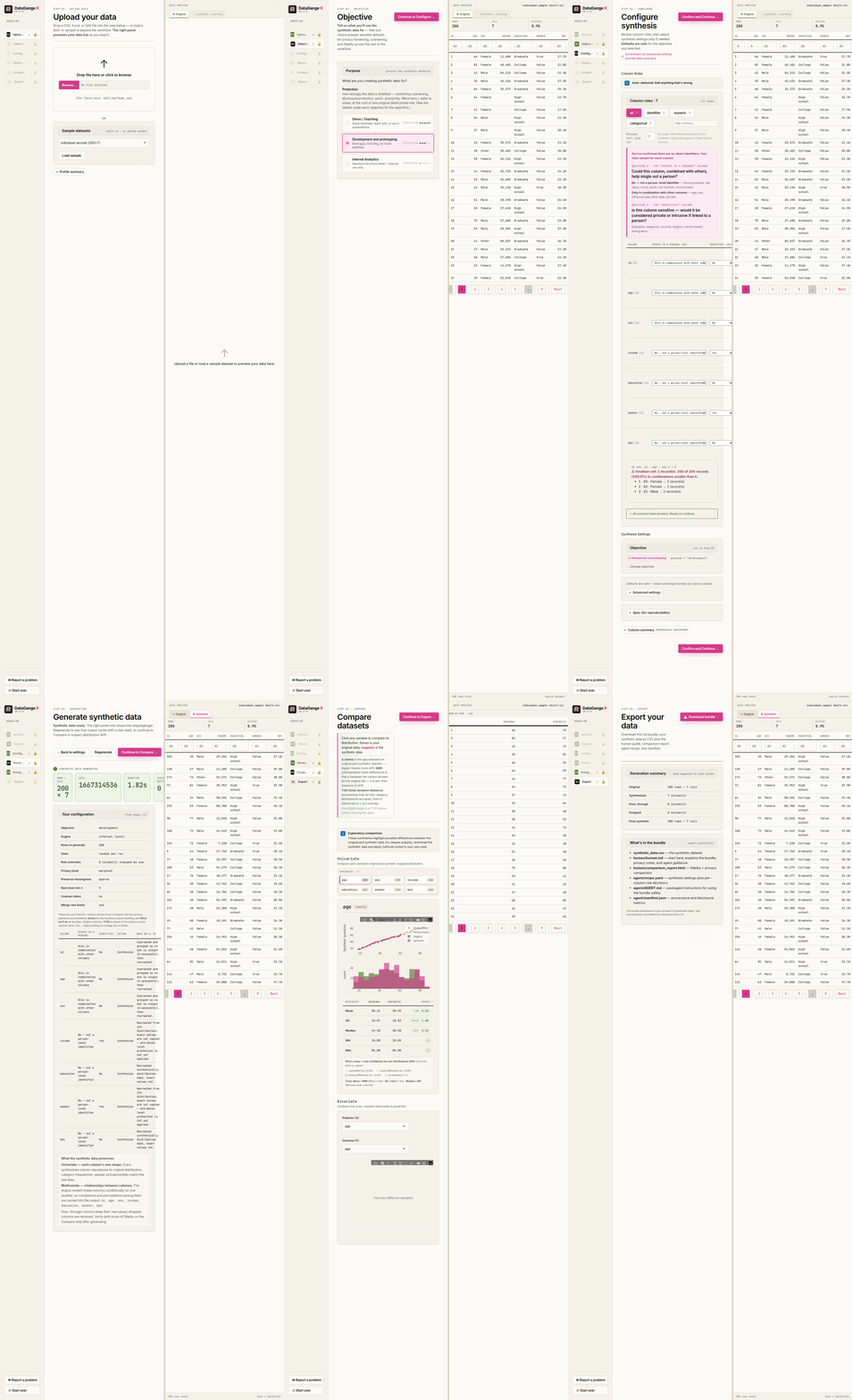
The Shiny app takes the user through six stages:
- Objective — choose a synthesis posture for development, demo, or analytics.
- Upload — load a supported file or a built-in example.
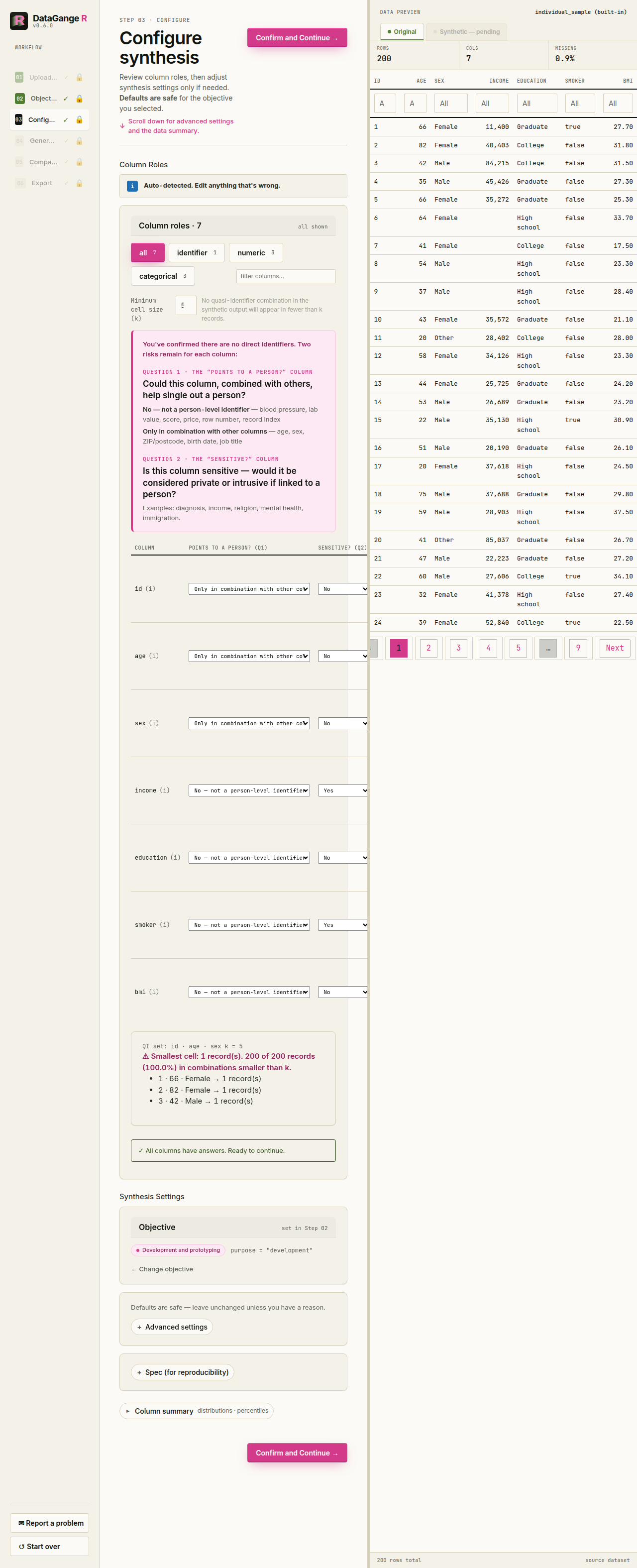
- Configure — review identifiers and sensitive roles column by column.
- Generate — create the synthetic stand-in.
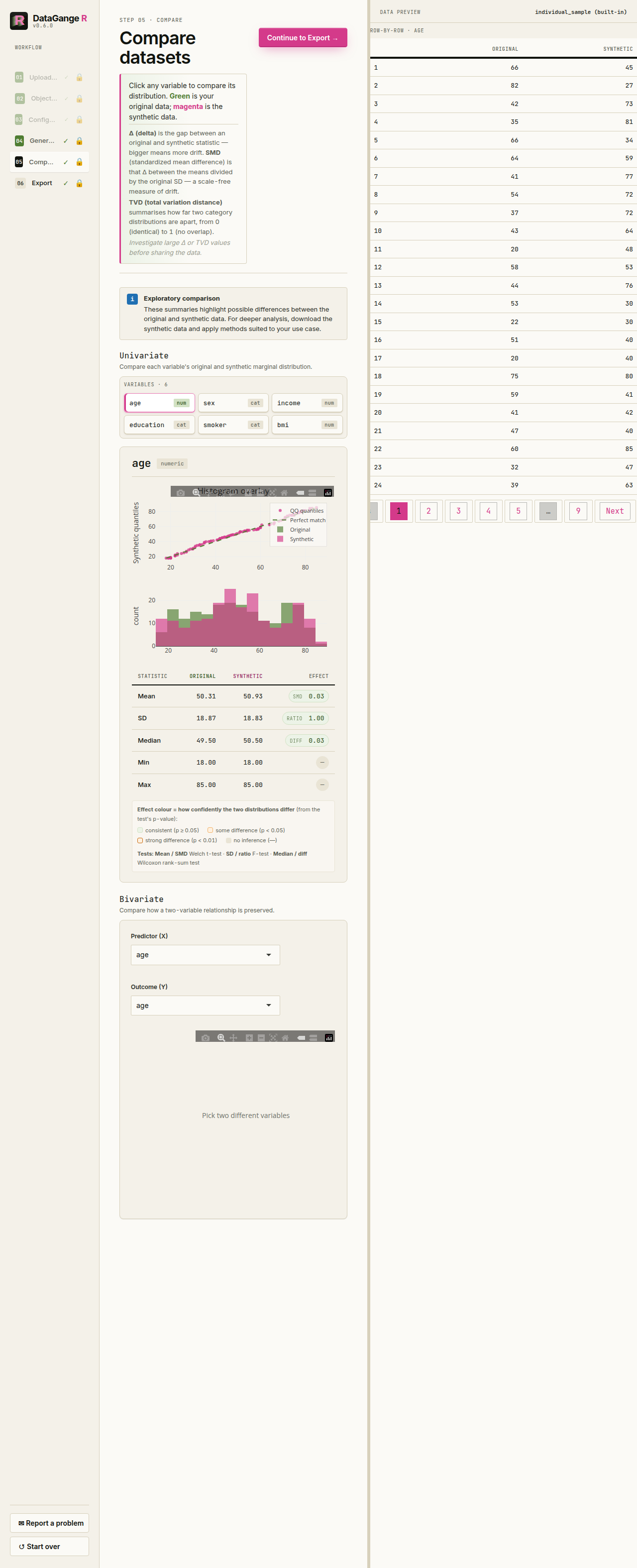
- Compare — inspect univariate and relationship-level fidelity.
- Export — review disclosure warnings and create the bundle.
The preview flags exact synthetic-to-original row matches. Export is blocked when populated sensitive values are reproduced exactly unless the user regenerates or explicitly acknowledges the remaining risk after review.
| Classify columns | Compare real vs. synthetic |
|---|---|
 |
 |
For the complete privacy model, see the privacy and Agent workflow vignette.
Synthesis engines
DataGangeR supports two synthesis paths:
-
synthpop— recommended for relationship-aware synthesis. - Internal engine — dependency-light fallback for marginal synthesis.
The development, demo, and analytics objectives choose different defaults for fidelity and disclosure posture. Higher-fidelity settings require more careful review and, where applicable, explicit risk acknowledgement.
When using the synthpop engine, please cite:
Nowok B, Raab GM, Dibben C (2016). “synthpop: Bespoke Creation of Synthetic Data in R.” Journal of Statistical Software, 74(11), 1–26. doi:10.18637/jss.v074.i11
Frozen generators: freeze once, generate many
The pipeline above opens the real data every time it runs. When a team needs a fresh synthetic dataset repeatedly, DataGangeR can instead freeze a reviewed synthesis policy against the real data once and generate from the approved fitted state afterwards, without reopening the source.
frozen <- freeze_synthesis(dat, spec, roles,
                           allowed = generation_limits(n = c(50L, 5000L)),
                           store   = "~/.dataganger-store")
approve_generator(frozen, approver = "a.reviewer")

syn <- generate_synthetic(frozen, seed = 7, n = 500)
Freezing fits the generator into a private store; approval is a separate human sign-off that binds one fitted generator for use; each generation is a bounded request inside the approved seed, row, and dataset ranges, and produces an audit receipt. revoke_generator() ends an approval and destroy_generator() permanently removes the fitted state while keeping the contract tombstone and receipts. The same lifecycle is available as dataganger generator ... subcommands.
This is not the export recipe. recipe.yaml records the synthesis configuration, not a fitted generator, and cannot regenerate data by itself; a frozen generator retains the fitted state deliberately, in a private store, under an explicit approval.
A host can also configure a generate-only route so a coding Agent can request a new bundle from an approved generator with no access to the real data. The package ships both halves of that route and the handshake that verifies isolation; it does not create the isolation, the host does.
For the full walkthrough, the contract/generator/approval/request terminology, the reproducibility envelope, and the migration note for generators frozen before the exact-row portability fix, see the frozen generator workflow article.
CLI / Agent workflow
The same pipeline is available from the command line:
dataganger profile my-data.csv --out profile.json
dataganger roles my-data.csv --out roles.yaml
dataganger spec --purpose development --out spec.yaml
dataganger synthesize my-data.csv --spec spec.yaml --out dataganger_bundle.zip
dataganger inspect dataganger_bundle.zip
Print or copy the packaged Agent workflow guide with:
Security and privacy
DataGangeR is intended to reduce unnecessary exposure of original records during prototyping. It is not a formal anonymization guarantee and does not replace a privacy, legal, or regulatory assessment.
Do not post sensitive data, synthetic output derived from sensitive data, or credentials in public GitHub issues. See SECURITY.md for private reporting guidance.
Project status
The current release is available from CRAN and is tested through GitHub Actions on Windows, macOS, Linux release/devel/oldrel, a dedicated synthpop path, and a network-disabled test job.
See NEWS.md for release history and the documentation site for the full reference and vignettes.